Know who holds the money
Verify customers with an ID and a selfie, screen them against sanctions and PEP lists, keep them up to date with ongoing monitoring, and confirm it is really them before a high-value action.
- E-money and wallets
- Payment processors
- Neobanks
- Lending apps
Onboarding is only the first check
A customer approved last year can be on a sanctions list today, their passport can expire, and someone else can try to take over their account. Payment businesses need verification that keeps going after the first approval, with a record of what was checked and when.
- sanctions lists
- 4
- UN, EU, OFAC and UK, plus MASAK, PEP and adverse media.
- re-screens
- Free
- When a list publishes a new version.
- checks per case
- 30+
- Document, tamper, liveness, face, device and network.
- webhook events
- 12
- Signed, and retried with backoff.
The flow we would start with
Every step is configurable and can have conditions, so a step only shows when your rules ask for it. Publish a new version whenever your policy changes.
- 1Email or phoneA one-time code, with disposable and VoIP checks
- 2ID documentMRZ, barcode and number checksums read and compared
- 3Selfie and livenessMatched to the document photo
- 4AML screeningSanctions, PEP and adverse media, with list versions on record
- 5Proof of addressRecency and name checked against the ID
How xiomid handles it
A clear result says what was searched
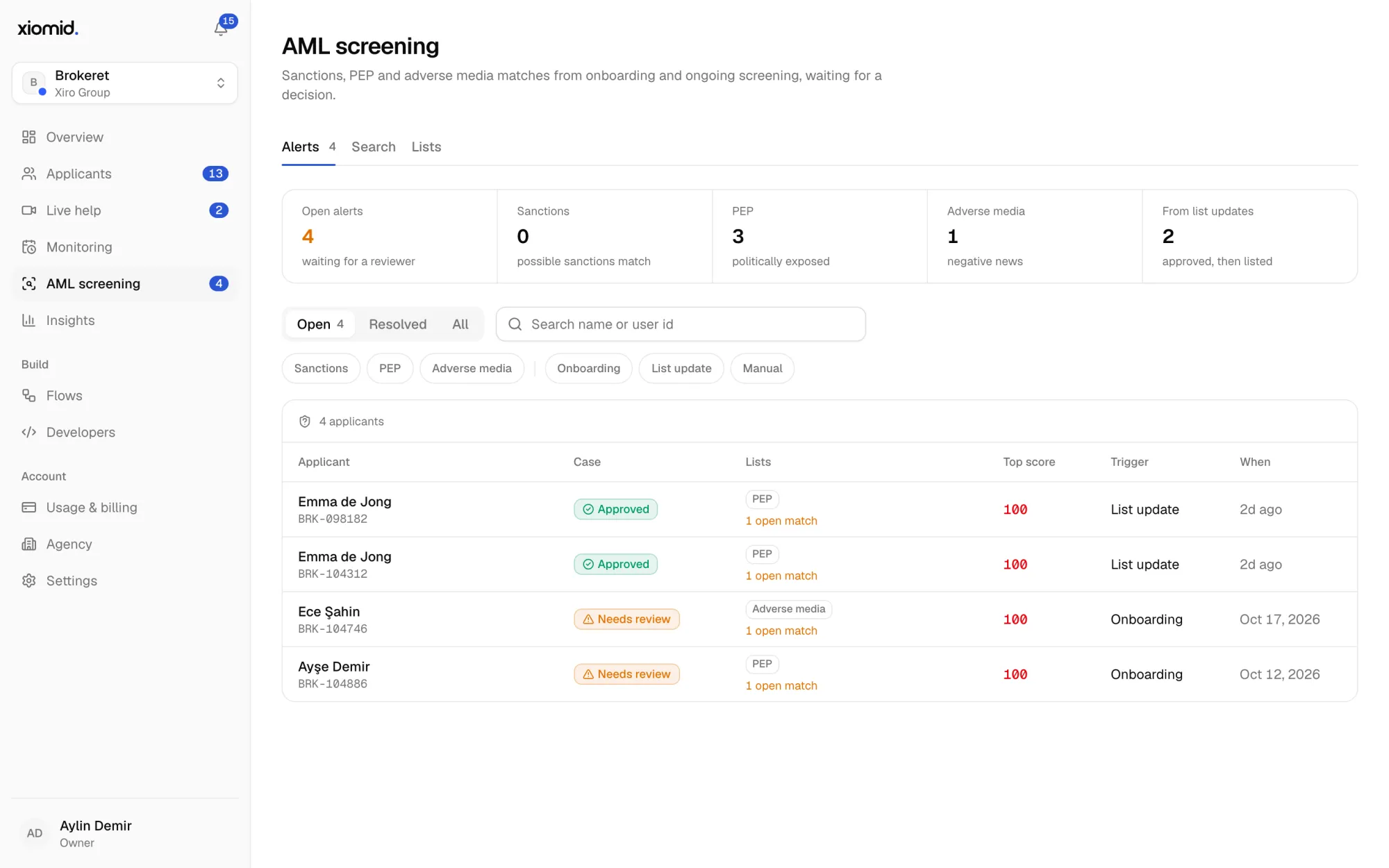
Every screening stores the lists and versions it ran against, with their entry counts, and a frozen copy of each hit, so a past result never changes when a list does.
Matches go to people
A possible sanctions match goes to review by default. Your reviewer marks it as a true match or a false positive, with a note, and can whitelist the entry for that customer.
Monitoring after approval
Approved customers are re-screened when lists update, asked for a new document before theirs expires, and re-verified on a schedule by risk level.
Step-up checks for risky moments
A selfie re-check before a large transfer, a payout to a new account or a change of phone number. It takes a few seconds and costs a few cents.
Signals beyond the document
IP country against the document, VPN, Tor and datacenter networks, virtual cameras and devices used by several applicants.
Your rules, versioned
Score bands for approve, review and reject, conditions per step and four-eyes review for high-risk cases. Every flow is versioned, so a change never breaks an applicant halfway.
The product doing the work
Every step above runs on parts of xiomid you can try free, with sandbox keys, before you go live.
AML screening
Sanctions, PEP and adverse media, at onboarding and after.
Learn moreOngoing monitoring
New documents before old ones expire, and re-KYC on a schedule.
Learn moreIdentity verification
ID document, liveness selfie and face match, decided in about a minute.
Learn moreReuse and re-checks
Verify once, reuse across your brands. Confirm returning customers with a selfie.
Learn moreFrequently asked questions
Can we decide which customers need enhanced checks?
Yes. Flows have conditions: add proof of address or a source of funds questionnaire only when, for example, the IP country differs from the document or the score is low.
Can a reviewer approve a case the machine flagged?
Yes, with a note on record. Reviewers can approve, reject or ask the applicant to redo one step, and four-eyes review can require a second reviewer for high-risk cases.
How do we connect it to our core system?
Create an applicant and a session with two API calls, send the customer to the hosted page or open the SDK in your app, and receive the decision as a signed webhook.
Where is customer data stored?
Each brand chooses its data region when it is created: the European Union (Frankfurt) or the United States (Virginia). Data and media stay there, encrypted, in private storage.
More answers about documents, data and billing in the full FAQ.
Build your first flow today
Start from the flow above, change any step, and test it with sandbox keys that are never billed. The first 500 live verifications every month are free.
500 verifications free every month. No card to start.